What support automation actually means for a small team
For a team of two to ten people, support automation is rarely a full chatbot that closes tickets on its own. In practice it is a stack of smaller helpers: an assistant that deflects common FAQs, a drafting tool that writes a first-pass reply for an agent to edit, and a triage layer that tags and routes incoming messages so the right person sees them sooner.
The mistake is buying the biggest promise. Vendors love to talk about resolution rates and tickets handled with no agent involved. For a small team the more useful framing is time saved per ticket and how many low-value, repetitive questions you can answer instantly while keeping a person in the loop for anything sensitive.
Decide up front which job you are automating first. Trying to deflect, draft, and route all at once usually means none of them work well. Pick the highest-volume, lowest-risk question type and start there.
A safe triage and drafting workflow
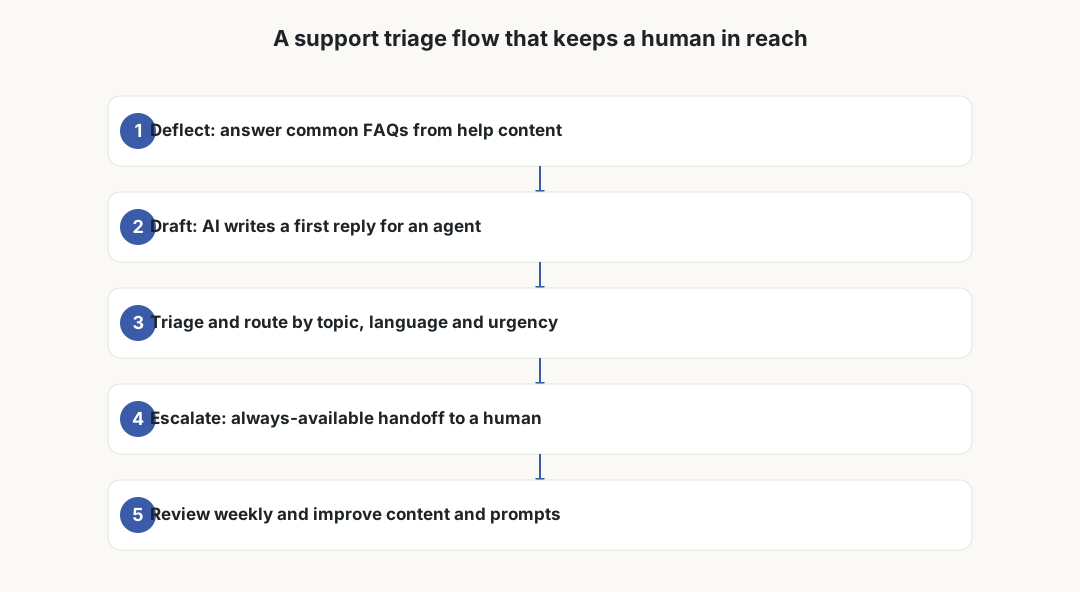
A workflow that survives contact with real customers always keeps an exit to a human. Start by deflecting the obvious FAQs with a help-center answer or a short bot reply. If that does not resolve the question, the tool should draft a reply for an agent rather than send it blind.
From there, triage and route the message to the right inbox or person based on topic, language, and urgency. The non-negotiable step is an always-available escalation path: at any point the customer can reach a human, and the bot never traps them in a loop. Finally, review the conversations weekly and feed the gaps back into your help content and prompts.
- Deflect repetitive FAQs with help-center content or a short, sourced answer.
- Draft replies for agents to edit instead of auto-sending on sensitive topics.
- Triage and route by topic, language and urgency.
- Offer an obvious, always-available handoff to a human.
- Review weekly and improve prompts, content and routing rules.
How the tools actually price (and where it bites)
The market mixes several pricing models, and small teams get caught when they assume one and get billed on another. Per-seat pricing (common in Zendesk AI, Freshdesk, HubSpot and Tidio) is predictable but adds up as you grow. Usage pricing charges per resolution or per conversation; Intercom Fin, for example, popularised a per-resolution model, which can be cheap at low volume and surprising during a spike.
Watch for AI features sold as add-ons on top of your existing plan. A help desk you already pay for may gate its AI summaries, reply drafts, or bot behind a separate per-seat or per-use fee. Jotform AI and similar form or FAQ builders may price by submissions or AI credits. Always model your busiest month, not your average one.
Prices and packaging change often, so treat any number you find online as a starting point and confirm current terms with the vendor. Before committing, ask what counts as a billable resolution, whether failed or escalated conversations are charged, and what happens if you exceed an included allowance.
- Per-seat: predictable, but scales with headcount.
- Per-resolution or per-conversation: cheap at low volume, volatile during spikes.
- AI add-on fees layered on a plan you already pay for.
- Credits or submission-based pricing on form and FAQ builders.
Privacy and GDPR before you connect anything
The moment a customer message reaches an AI tool, you are processing personal data and likely sharing it with a new processor and its sub-processors. Before you connect an inbox, get a data processing agreement (DPA) in place and read it. Confirm where data is stored and processed, who the sub-processors are, and how long conversations are retained.
Check explicitly whether your customer data is used to train the vendor's models, and whether you can opt out; for business use you almost always should. Look for PII redaction so card numbers, health details, or government IDs are not sent or stored unnecessarily, and prefer EU data residency where you can choose it.
If any processing happens in the United States, understand the EU-US data transfer position and the safeguards the vendor relies on. This area shifts, so document the vendor's current stance rather than assuming it is settled. None of this is legal advice; when in doubt, get a professional to review the DPA.
- Signed DPA covering the tool and its sub-processors.
- Clear storage and processing locations, with EU residency if available.
- Defined retention periods and a deletion process.
- Training opt-out so customer data does not improve the vendor model.
- PII redaction for sensitive fields before storage.
- Documented position on EU-US data transfers.

Failure points that cost more than the subscription
Most expensive mistakes are not the monthly fee; they are bad answers. A confidently hallucinated policy can commit you to a refund or a promise you never offered, and many businesses feel obliged to honour what their own channel said. Constrain the AI to sourced answers and keep money, cancellations, and legal topics behind human review.
Bot loops are the other classic failure: a customer asks the same thing three ways and never reaches a person. Test the escape hatch as hard as the happy path. Multilingual gaps also bite small international teams, where an answer is fine in English but wrong or clumsy in Danish, German or Italian.
Measure quality, not just deflection. A high deflection rate that quietly sends frustrated customers away is worse than a slower, human-reviewed reply. Track reopen rates, escalations, and customer satisfaction alongside the headline automation number.
Drawing the bot-versus-human boundary
The clearest way to stay safe is to write down what the AI may answer alone and what it must hand off. Informational, low-risk, well-documented questions are good candidates for automation. Anything that changes money, account status, or legal standing belongs with a person, at least as a review step.
Give agents the AI as a drafting and summarising tool rather than an autopilot. A good setup lets a person approve, edit, or reject every consequential reply in seconds, so you get the speed without surrendering the judgement.
A realistic rollout for a small team
Start in suggestion mode: the AI drafts, an agent sends. Run it for a few weeks on your highest-volume topic and read a sample of the conversations yourself. Only widen the scope once you trust the quality and have the privacy paperwork in order.
Keep a short kill switch and an owner. Someone on the team should be responsible for the prompts, the escalation rules, and a weekly look at what went wrong. Automation is not set-and-forget; it is a process you tune, and the savings come from steady improvement rather than a single big switch.
Frequently asked questions
Can AI replace our support team?
No, and you should not plan for that. For small teams AI works best as a drafting and triage assistant that speeds up replies and deflects repetitive questions, while a person still owns sensitive answers and the final send. Treat it as leverage, not a replacement.
What is the most common hidden cost?
Usage-based fees during traffic spikes, and AI features sold as add-ons on top of a plan you already pay for. Always model your busiest month and ask the vendor exactly what counts as a billable resolution or conversation.
Do we need a DPA even for a tiny team?
Yes. As soon as a customer message reaches the tool you are processing personal data with a new processor. A signed data processing agreement, clear retention, and a training opt-out are baseline requirements under GDPR regardless of team size.
How do we stop the AI from making promises we cannot keep?
Constrain it to sourced answers, keep money, cancellation and legal topics behind human review, and test the escalation path so customers can always reach a person. A confidently wrong policy answer can become an obligation you must honour.
Should we measure deflection rate?
Measure it, but never alone. A high deflection rate can hide frustrated customers who gave up. Track reopen rates, escalations and satisfaction so you are improving quality, not just reducing visible tickets.
How should a small team start?
Begin in suggestion mode on one high-volume, low-risk topic, read a sample of conversations yourself, and only widen scope once quality is good and the privacy paperwork is signed. Keep one owner and a kill switch.
Sources and verification date
Verification date: 2026-06-14. These links support the verification framework for this public-evidence page; private dashboard-only claims remain unverified unless stated in the article.