
What AI photo tools actually do well
The strongest, safest use of AI in product photography is cleanup and presentation, not invention. Tools such as PhotoRoom, Pixelcut and Canva are built to remove or replace backgrounds, even out lighting, straighten and crop, and drop a product onto a clean white or coloured backdrop. Pebblely and Adobe Firefly can go further and place your item into a generated scene — a styled shelf, a marble surface, a soft lifestyle setting — so a single phone photo can yield several listing-ready variations.
Used this way, AI mostly saves time and lowers the bar to a professional-looking shop. You still photograph the real object; the model is helping with the tedious parts that used to need a lightbox, a sweep background and an afternoon of editing. That is a reasonable, defensible use of the technology.
The line to hold is simple: AI may improve how the product is presented, but it must not change what the product is. The moment a tool brightens a dull mustard yellow into a vivid lemon, smooths a hand-thrown mug into machine-perfect symmetry, or adds a strap that is not in the box, the image stops being a photo of your product and becomes a picture of something you do not sell.
Shoot a real, honest source image first
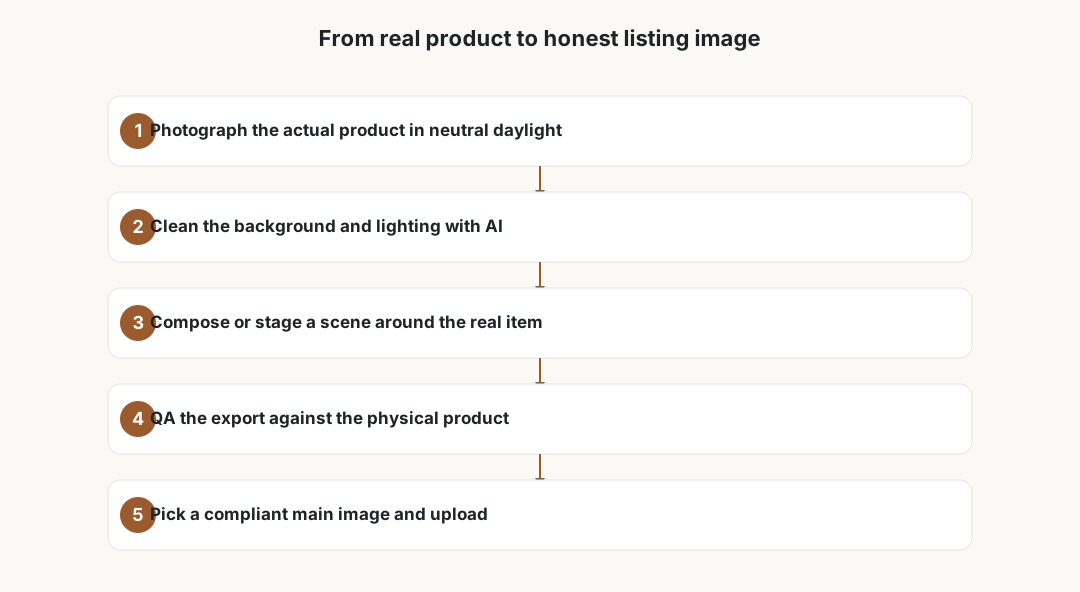
Every safe AI workflow starts with a truthful capture of the actual item you will ship. Photograph the specific product, not a prototype, a borrowed sample or a sharper-looking competitor's piece. Shoot in soft, even daylight where possible, because accurate colour and texture in the source make the AI step far less likely to drift from reality.
Capture the things buyers most often complain were misrepresented: true colour under neutral light, the real scale next to a familiar reference, the actual materials and finish, and every part that is genuinely included. If a set contains three items, the source photo should show three items, so a generated scene cannot quietly imply more.
Keep at least one untouched original of each product on file. If a buyer, a marketplace or a consumer authority ever questions whether an image is accurate, an unedited reference photo is the fastest way to show that the listing matches the goods.
- Photograph the exact unit you sell, in neutral daylight.
- Include a scale reference so size is not exaggerated.
- Show every included part; do not stage extras you will not ship.
- Save an untouched original for your records.
Clean up and stage without rewriting the product
With a faithful source image, AI cleanup is mostly safe. Removing a cluttered kitchen background, evening out a harsh window glare, squaring up the crop and placing the item on a clean backdrop change the setting, not the product. Background replacement and shadow generation in PhotoRoom or Pixelcut fall into this lower-risk category as long as the item itself stays untouched.
Generated scenes need more care. A lifestyle background from Pebblely or Firefly is fine when it is clearly a setting, but watch for two traps: the tool subtly altering the product to match the scene, and the scene implying things that are not for sale. A candle photographed on a styled tray must not look like the tray, the matches and the book are part of the listing unless they are.
Be especially careful with colour and texture. Auto-enhance and relighting can shift hues enough that buyers receive something noticeably different. After every edit, compare the export side by side with the physical item under normal light and correct the colour back toward reality rather than toward whatever looks most appealing.
Know the marketplace image rules
Marketplaces have specific, enforceable image policies, and they change, so check the current version for each platform you sell on. Etsy expects listing photos to represent the actual item the buyer will receive and has guidance on disclosing how images were made; heavily generated imagery that misrepresents the product can put a shop at risk.
Amazon is stricter on the main image: it generally must show the actual product on a pure white background, fill most of the frame, and carry no added text, logos, graphics, props or inset images. A generated lifestyle composite that breaks those rules can get a listing suppressed even if it looks great. eBay and Shopify lean on accuracy and your own descriptions, but Shopify still expects you to follow consumer law and not mislead.
Treat any AI scene as a secondary image rather than the main one unless you have confirmed it meets that marketplace's main-image rules. When in doubt, the plain, accurate shot belongs in the lead position and the styled versions support it.
Copyright, trademarks and props
AI-generated images carry unsettled intellectual-property questions. The rights status of outputs built from large training sets is still contested in several jurisdictions, and in some places purely AI-generated images may not attract the same copyright protection you would assume. That uncertainty matters most if you plan to license or aggressively defend your product imagery.
Generated scenes can also pull in other people's IP. A model may render a recognisable brand logo, a trademarked character, distinctive packaging, or a real person's likeness into the background or props without you noticing. Putting another brand's logo on a styled shelf, or a recognisable face in your scene, can create trademark, publicity or privacy problems.
Stock and template backgrounds are not automatically free for commercial resale use. Check the licence of any background, mockup or template you layer your product onto, and keep a note of where each asset came from and what the licence allows.
The real cost of AI photo tools
Most AI photo tools are cheaper than a studio shoot, but rarely free in practice, and pricing changes often, so verify current terms before you commit. The common pattern is a free tier that adds a watermark, limits resolution, or caps the number of exports, then a monthly subscription that unlocks clean, full-resolution downloads.
Watch for per-image or credit-based pricing on the generative features specifically. Background removal might be unlimited while each generated lifestyle scene or high-resolution export costs a credit, so a big seasonal batch can become surprisingly expensive. Resolution is a frequent gotcha: a free export may be too small or too compressed for a marketplace's image requirements, nudging you toward the paid plan.
Stacking subscriptions is the quiet leak. A background tool, a design app and a separate generative-scene service can each look affordable while together costing more than occasionally hiring a photographer. Before adding another tool, check whether something you already pay for does the same job.
- Free tier: often watermarked, low-resolution, or export-capped.
- Subscription: monthly fee unlocks clean, full-size downloads.
- Per-image or credits: generative scenes and HD exports may be metered.
- Resolution locks: free outputs can fall below marketplace requirements.
- Prices and limits change; confirm current terms for each tool.
Human QA, disclosure and consumer law
Before anything goes live, a person should compare each image against the physical product: colour, scale, materials, finish and included parts. This human QA step is the single most important safeguard, because an automated tool optimises for an attractive picture, not for an honest one. If the export no longer matches the item, edit it back toward the truth or reshoot.
Disclosure is increasingly expected. Some marketplaces ask sellers to indicate when listing images were generated or heavily edited, and being upfront protects you if a buyer feels misled. Misleading product images can fall under general consumer-protection and unfair-trading rules wherever you sell, quite apart from any marketplace policy.
If you ever use a real person — a model, a hand, a face — in a generated or composite scene, you need their consent, and any personal data involved falls under the GDPR. Keep this in mind even for casual lifestyle shots that include identifiable people.
Frequently asked questions
Is it allowed to use AI to edit product photos on Etsy or Shopify?
Generally yes, for cleanup and staging, as long as the image still truthfully represents the actual item a buyer will receive. Etsy expects listing photos to show the real product and has guidance on disclosing how images were made, and Shopify sellers must follow consumer law. Problems start when AI changes colour, scale, materials or contents, or adds features the product does not have.
Which AI tools do small sellers commonly use?
PhotoRoom, Pixelcut and Canva are common for background removal, relighting and clean backdrops, while Pebblely and Adobe Firefly can place a product into a generated lifestyle scene. Most offer a free tier with watermarks or resolution limits and a paid monthly plan, and some meter generative features or HD exports by credit. Prices and limits change, so check current terms.
Can AI product photos increase my sales?
No tool can promise that. Cleaner, accurate images can help buyers understand a product, but views and sales depend on your product, price, niche and listing quality. Treat AI as a way to save editing time and present the item honestly, not as a guaranteed boost. Misleading images that lift clicks but cause returns and complaints usually cost more than they earn.
Do I have to disclose that an image was AI-generated?
Increasingly, yes. Some marketplaces ask sellers to indicate when images were generated or heavily edited, and general consumer-protection rules everywhere prohibit misleading buyers. Disclosing AI use and keeping images accurate protects you if a buyer feels the photo did not match the goods. Check each platform's current policy.
What are the copyright and trademark risks?
The rights status of AI-generated images is still unsettled, and outputs may not get the protection you assume. Generated scenes can also include recognisable logos, trademarked characters or real people's faces without you noticing, creating trademark, publicity or privacy issues. Stock and template backgrounds need their own licence for commercial use, so check before you publish.
How do I keep AI images honest?
Start from a real photo of the exact item in neutral light, limit AI to changing the setting rather than the product, and compare every export to the physical item for colour, scale, materials and included parts before uploading. Keep an untouched original on file, and reshoot or correct anything that drifts from the real product.