Pick a problem people already pay to solve
Start with a boring, specific workflow rather than a vague promise to sell ‘AI products’. Useful templates usually remove friction from a job someone already repeats: a freelance onboarding pack, a client intake form, a social-content calendar, a product-description worksheet, a budget spreadsheet or a Notion CRM for a small team. The narrower the use case, the easier it is to make the template genuinely helpful.
Do not choose the niche only because a keyword tool shows volume. A template buyer wants to know whether the product fits their exact situation. A ‘marketing planner’ is too broad; a ‘launch checklist for a solo course creator who sells through Gumroad’ is clearer. Specificity also makes refunds less likely because the listing can describe exactly who the product is for and who should skip it.
- Name the buyer and one repeated task.
- List the input they already have and the output they need.
- Write one honest sentence explaining who should not buy it.
- Check whether marketplace rules allow that product type.
Use AI for drafts, not final judgement
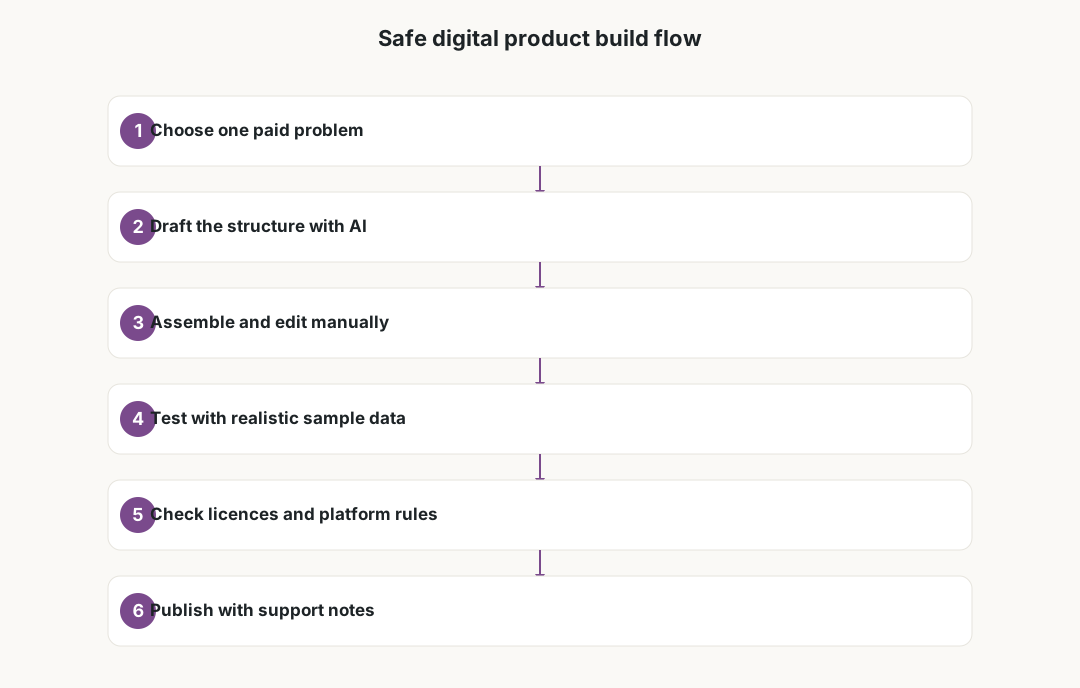
AI is useful for first structure: section ideas, prompt variations, spreadsheet labels, example copy and alternative wording. It is weak at knowing whether a template works in a real tool, whether a formula breaks, whether a Notion relation is confusing, or whether a prompt violates a platform policy. Treat AI output as scaffolding that must be rebuilt by a human.
A safer build loop is simple: draft with AI, assemble manually, test with realistic sample data, remove anything that looks impressive but does not help the buyer, and write plain-language instructions. If the product includes prompts, test them with several inputs and record what users must change. If it includes a spreadsheet, check formulas after duplicating the file. If it includes design assets, confirm the licence and avoid imitating another seller’s layout.
Build quality into the package
A template feels professional when the buyer can open it and understand what to do in the first two minutes. Add a short start-here page, a worked example, a blank version and a troubleshooting note. Use filenames that make sense after download, and keep the design restrained enough that it prints, exports or copies cleanly.
The most common weak point is missing context. A prompt pack without examples is just a list of sentences. A spreadsheet without assumptions is a trap. A Notion dashboard without instructions leaves the buyer guessing which database to duplicate first. Write the support material before publishing, because it exposes holes in the product while they are still cheap to fix.
- Include a blank template and a filled example.
- Add setup steps in the order a buyer will follow them.
- Mention tool dependencies, account requirements and export limits.
- Test the download, duplicate and mobile view before listing.
Check licences, originality and platform rules
Marketplaces such as Etsy, Gumroad, Creative Market and Shopify stores all have rules for digital downloads, refunds, copyright, trademarks and AI-generated content. Those rules change, and some categories require clearer disclosure than others. Before publishing, read the current seller policy instead of copying another listing’s wording.
Licensing is where shortcuts become expensive. Do not use stock icons, fonts, photos, mockups or generated images unless the licence allows your exact commercial use. Do not resell raw AI output as if it were a handmade or exclusive asset. If a product is AI-assisted, describe the role of AI plainly and focus the value proposition on your editing, testing, structure and documentation.
- Avoid trademarked brand names in the product title unless nominative use is clearly allowed.
- Keep proof of licences for fonts, icons, mockups and images.
- Do not claim exclusivity if buyers receive the same file.
- Disclose AI assistance where the platform or buyer expectation requires it.
Price, refunds and support without fantasy numbers
There is no honest universal price for a digital template. Simple checklists may sell cheaply; specialised workflow kits can justify more if they save real setup time, but price depends on audience, competition, support burden and platform fees. Instead of inventing income projections, calculate your break-even point: time to build, cost of tools, marketplace fees, tax, support time and the number of sales needed to make the project worth maintaining.
Refund policy matters because digital products are copied instantly. Some platforms allow limited refunds, others require clearer consumer-rights language by region. A strict no-refund stance can reduce abuse but also scares cautious buyers if the listing is vague. The practical solution is better previews: screenshots, table of contents, compatibility notes and a clear ‘not for you if’ section.
Local tax, privacy and customer-data caveats
Selling templates is still business income. Depending on where you live and where your customers are, you may need to track invoices, VAT or sales tax, marketplace statements and business expenses. Tools, ad spend, mockups and subscriptions may be deductible in some places, but rules differ. This guide is not tax advice; ask a qualified local professional before relying on deductions or thresholds.
Privacy can enter even a simple template business. If buyers email support, submit intake forms or share files for troubleshooting, you may process personal data. In the EU and UK, GDPR duties can apply. Keep customer data minimal, avoid asking for sensitive files, and use support workflows that do not require uploading private business documents into AI tools.

A safe launch workflow
Launch small. Publish one focused product, not a store full of generic AI bundles. Ask two or three real users to try the template with their own workflow and watch where they get stuck. Fix the confusing parts, rewrite the listing with their questions in mind and only then consider translations, bundles or paid promotion.
After launch, maintain the product. Platform interfaces change, Notion and Canva templates drift, spreadsheet functions vary by locale, and AI prompt results shift as models update. A dated changelog and a contact route for corrections make the product feel alive instead of abandoned. The traffic win comes from being useful and trustworthy over time, not from claiming that AI created an effortless income stream.
Frequently asked questions
Can AI create a digital product for me?
AI can help draft structure, text, prompts and examples, but it cannot replace product judgement. You still need to assemble, test, edit, document and support the product before selling it.
What digital products fit AI assistance best?
Templates, checklists, planners, prompt packs, spreadsheets and onboarding kits can fit well when they solve a narrow repeated task. Broad ‘AI business bundles’ usually become generic and harder to trust.
Do I need to disclose AI use?
Check the current policy of the platform you sell on. Even where disclosure is not mandatory, clear wording about AI assistance can reduce buyer confusion and keeps the value focused on your editing and testing.
Can this guarantee passive income?
No. Digital products can sell, but there is no promised income. Results depend on product quality, demand, distribution, support, pricing, platform rules and competition.
What should I avoid in the listing?
Avoid fake revenue screenshots, invented customer results, copied assets, unsupported legal or tax claims, and promises that the buyer will earn a specific amount by using the product.
What tax rules apply?
Income from digital products is generally taxable, and VAT or sales tax may apply depending on your location and platform. Keep records and ask a qualified local professional; this guide is not tax advice.