Start with one strong source, not ten formats
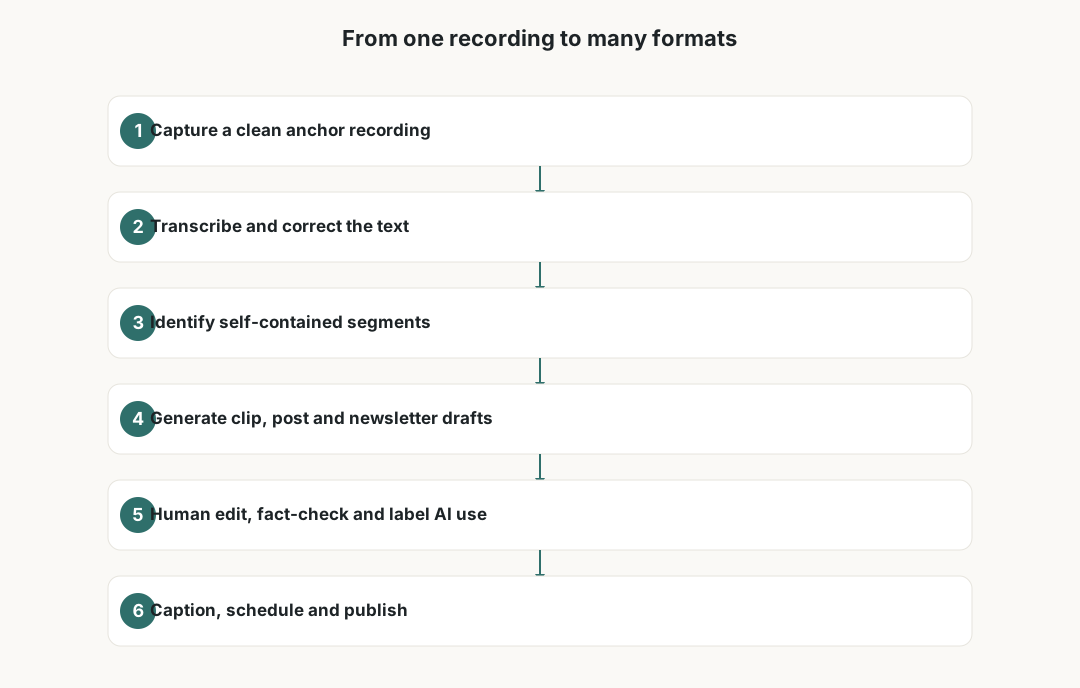
Repurposing works best when the source is genuinely good. A rushed thirty-minute stream produces thin clips no matter how clever your tools are. Pick one anchor piece per week — a long video, a podcast episode or a recorded live session — and treat it as the well you draw from. Recording cleanly at the source saves hours later: a quiet room, a decent microphone and a tool such as Riverside or Descript that captures separate tracks make transcription and editing far easier.
Before you automate anything, decide which output formats actually fit your audience and platforms. Short vertical clips, carousel posts, quote cards, an email newsletter and written show notes are common, but you do not need all of them. Choosing two or three formats you can sustain beats publishing six formats once and then quietly abandoning the system.
Write down a simple target: for example, one anchor video becomes three vertical clips, one newsletter and one set of show notes. A fixed target turns repurposing into a checklist rather than an open-ended creative scramble every week.
Transcribe and segment before you generate anything
The transcript is the backbone of an AI repurposing workflow. Tools like Descript and Riverside produce a timed transcript automatically, and that text becomes the raw material for clips, posts and newsletters. Automatic speech recognition has improved a great deal, but it still mishears names, brands, technical terms and accents, so a quick pass to fix obvious errors pays off across every downstream format.
With a clean transcript you can ask an AI assistant to identify self-contained segments: a clear answer to a question, a strong opinion, a short story, a step-by-step explanation. Clip-finding tools such as OpusClip can suggest moments automatically, but treat their picks as a shortlist, not a verdict. The model optimises for surface signals and does not know which moment matches your brand or which guest comment needs context.
Segment selection is where human judgement matters most. A clip can be technically punchy yet misleading once stripped from its surrounding discussion. Read each suggested segment in context before you commit to cutting it.
Generate drafts, then edit like a human
Once segments are chosen, AI tools can do the heavy lifting on first drafts: auto-cropping vertical clips, generating captions, drafting a newsletter summary, and turning a transcript into structured show notes. CapCut and Canva are common for clip editing and quote cards, while Descript handles text-based video edits. The speed gain is real, but a first draft is not a publishable asset.
Plan for a genuine human editing pass on every output. Check that captions match what was actually said, that names and brands are spelled correctly, and that any AI-written summary did not invent a fact, a statistic or a quote. Large language models will confidently produce plausible-sounding details that were never in your source — this is the single biggest review risk in the whole workflow.
Edit for your voice too. AI summaries tend toward a flat, generic register. Rewriting the opening line, trimming filler and restoring your own phrasing is what keeps repurposed content recognisably yours rather than interchangeable with everyone else using the same tools.
- Verify captions word-for-word against the audio, especially names and figures.
- Remove any AI-added claim, statistic or quote you cannot trace to the source.
- Rewrite the hook and closing line in your own voice.
- Confirm music, b-roll and images are licensed for the platforms you post on.
Label AI use and respect platform rules
Disclosure is no longer optional. YouTube requires creators to disclose altered or synthetic content that could mislead viewers, and surfaces a label on such videos. TikTok and Meta have their own AI-content labelling and increasingly detect and tag generated media automatically. If you use a synthetic voice, an AI avatar or generated visuals, label it clearly and do not rely on a platform missing it.
Captions are both an accessibility feature and a compliance touchpoint. Accurate captions widen your audience and are expected on most short-form platforms, but auto-captions with errors can spread misinformation faster than the spoken version. Treat caption accuracy as part of publishing, not a nice-to-have.
Music and clips carry the most legal risk. Trending audio that is fine inside one app can trigger a takedown when the same clip is reposted elsewhere, and royalty-free does not always mean cleared for commercial use. Keep a record of where each asset came from and under what licence.
Count the real costs before you subscribe
AI tools rarely cost nothing in practice. Free tiers usually add watermarks, cap export length, limit the number of clips or restrict transcription minutes. Paid plans are typically monthly subscriptions, sometimes per seat, and many meter usage through credits or export limits. Prices and limits change often, so check current terms rather than trusting an older figure.
Stacking tools is the quiet budget leak. A transcription tool, a clip generator, a design app and a scheduler can each look affordable alone while adding up to a meaningful monthly outgoing. Before adding a fourth subscription, ask whether a tool you already pay for covers the same job.
Time and storage are real costs too. Editing, fact-checking and captioning take human hours that automation reduces but does not erase, and long source recordings consume cloud and local storage. Factor both into whether a format is worth keeping in your rotation.
Privacy, guests and your local obligations
Repurposing often means processing other people's data. Guest voices and faces, audience questions and chat messages can all be personal data under the GDPR. If you upload someone else's voice or face to an AI tool, or train or clone from it, you generally need a lawful basis and clear consent, and you should know where that tool stores and processes the data.
In the United Kingdom and across the EU, the GDPR governs how you handle this information; check each tool's data-processing terms and avoid uploading sensitive recordings to services you have not vetted. Being able to explain, in plain language, what happens to a guest's recording is a reasonable bar to clear before you press upload.
Income from content is taxable. Sponsorships, platform payouts, affiliate revenue and product sales generally count as income wherever you are based, and tool subscriptions may be deductible business expenses. This guide is not tax or legal advice; confirm registration, invoicing and reporting rules with a qualified professional in your country.

Build a repeatable weekly system
The payoff of repurposing is consistency, and consistency comes from a system rather than motivation. Block a fixed slot to record the anchor piece, a second to transcribe and select segments, and a third to edit, review and schedule. Batching similar tasks keeps you out of the slow context-switching that makes repurposing feel like a second job.
Use a simple scheduler to queue outputs across the week so a single recording session keeps your channels active for days. Keep a lightweight log of which formats earn engagement and which quietly underperform, and prune the ones that consistently cost more time than they return.
Review the whole system monthly. Tool prices, platform rules and your own audience shift, and a workflow that worked in January can quietly drift out of date. A short monthly check keeps the process honest and your disclosures current.
Frequently asked questions
What is AI content repurposing?
It is the practice of taking one source recording, such as a long video or podcast, and using AI tools to help turn it into multiple formats like short clips, social posts, quote cards, a newsletter and show notes. The AI speeds up transcription and first drafts, while a human still selects, edits and approves what gets published.
Which tools do creators commonly use for this?
Common tools include Descript and Riverside for recording and transcription, OpusClip for finding clip moments, and CapCut and Canva for editing clips and designing quote cards. Most offer free tiers with watermarks or limits and paid monthly plans, and their prices and features change, so check current terms before subscribing.
Do I have to label AI-generated content?
Often yes. YouTube requires disclosure of altered or synthetic content that could mislead, and TikTok and Meta apply AI-content labels and increasingly detect generated media automatically. If you use a synthetic voice, AI avatar or generated visuals, label them clearly and follow each platform's current rules.
Can AI repurposing guarantee more income?
No. Repurposing can help you publish more consistently from the same source material, but it does not promise views, followers or income. Results depend on your content, audience and platforms. Treat AI as a time-saver, not a revenue promise, and keep a human in the loop for quality.
What are the biggest review risks?
The largest risk is AI inventing facts, quotes or statistics that were never in your source. Other frequent issues are caption errors on names and figures, clips that mislead once removed from context, and unlicensed music or visuals. A human editing pass on every output is the safeguard.
What privacy rules apply when I use guest recordings?
Guest voices, faces, audience questions and chat messages can be personal data under the GDPR. You generally need a lawful basis and consent before uploading someone else's voice or face to an AI tool, and you should know where the tool stores and processes that data. This is general information, not legal advice.