What AI actually does for your books
It helps to be precise about where AI adds value. The strongest, lowest-risk uses are receipt capture with optical character recognition, suggested expense categories, draft invoices generated from a project or time entry, automated payment reminders, and plain-language cash-flow summaries. These are repetitive, pattern-heavy tasks where a model genuinely saves time.
What AI does not do is decide how a transaction should be treated for tax. A suggested category is a starting point, not a ruling. The tool does not know whether a meal was a deductible client expense or a personal lunch, whether a purchase mixes private and business use, or which VAT rate truly applies to a borderline service. Those judgements stay with you and your accountant.
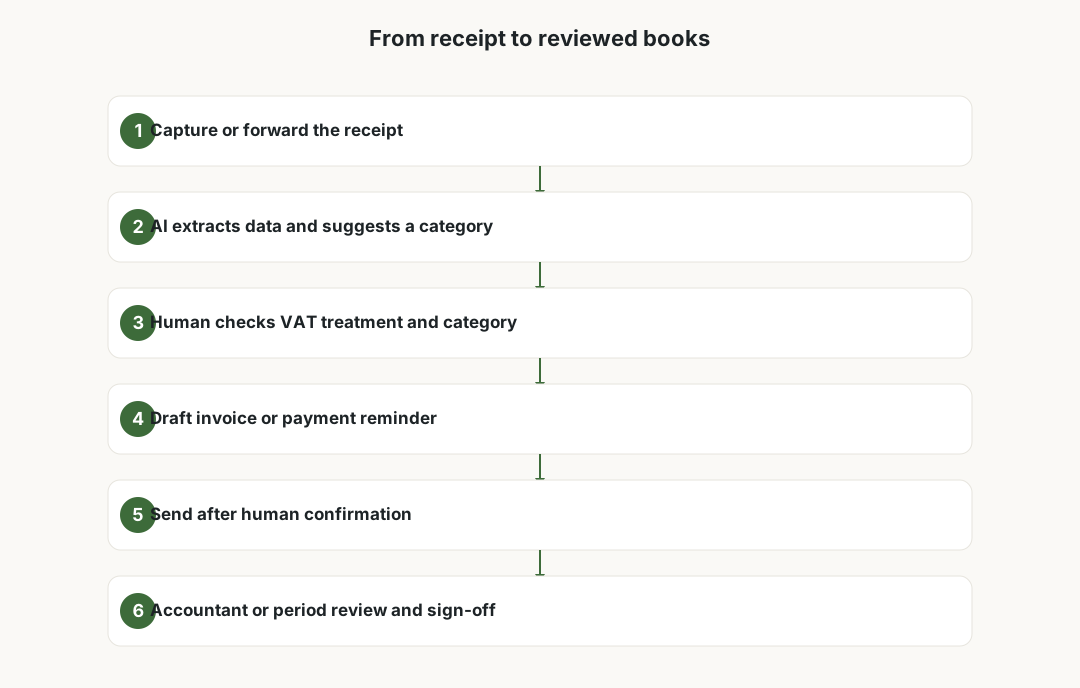
The mental model that keeps you safe is simple: AI drafts, a human approves. Every figure that ends up in a return, an invoice sent to a client, or a reminder chasing money should pass a human eye before it leaves the building.
A realistic receipt-to-invoice workflow
Start with capture. Photograph or forward receipts as they happen rather than hoarding a shoebox for the quarter. Most tools extract the supplier, date, total and tax amount automatically, which removes the dullest part of data entry. The catch is that OCR misreads faded thermal receipts, foreign formats and handwritten totals, so the extracted figures need a quick glance, not blind trust.
Next comes categorisation. The tool proposes an expense category and often a VAT treatment based on past entries. Review these in batches: confirm the obvious ones quickly and flag anything unusual, mixed-use or near a tax boundary for closer attention. This is where most filing errors are quietly prevented.
On the income side, AI can draft an invoice from a project note or timesheet, apply your usual rate and terms, and queue polite reminders for overdue balances. You still confirm the amounts, the correct tax lines and the client details before sending. Close each period with a human or accountant review rather than assuming the running totals are correct.
- Capture receipts as they happen, not in a quarterly rush.
- Check OCR figures against the actual receipt, especially totals and tax.
- Review AI category and VAT suggestions in batches and flag edge cases.
- Confirm amounts, tax lines and client details before any invoice is sent.
Pricing models without the hype
Popular tools such as QuickBooks, Xero, FreshBooks, Wave and Zoho Books all sell broadly similar capabilities through different pricing models, and the details change often, so always check current terms rather than a figure you saw last year. The common pattern is a tiered monthly subscription, with cheaper tiers capping the number of invoices, billable clients or transactions you can handle.
Watch for the add-ons. Receipt capture, advanced reporting, multi-currency, payroll and the newer AI features are frequently sold as paid extras or reserved for higher tiers rather than included by default. Annual billing is usually cheaper than monthly, and introductory discounts often expire after a few months, after which the standard rate applies.
Free tools deserve a second look at how they make money. A genuinely free plan may monetise through payment-processing fees, paid upgrades for support or features, or partnerships. None of that is sinister, but you should understand the model before you build your whole admin around it, especially if pricing or feature availability shifts later.
Privacy: your books are sensitive data
Financial records are among the most sensitive data a freelancer holds. They reveal your income, your clients, your suppliers and sometimes personal information about the people you invoice. Before you upload it all to a tool, find out where the data is stored, which sub-processors the provider uses, and what its data-processing agreement actually commits to.
Two questions matter most. First, retention: how long does the provider keep your data, and can you export and delete it cleanly if you leave? Second, training: is your content, including documents you upload to any AI feature, used to train the provider's models? Many business plans say no, but you should confirm it in writing rather than assume.
Client confidentiality is your responsibility too. An invoice or receipt can contain a client's personal data, so processing it through a third-party tool brings you within data-protection rules such as the GDPR. Keep access limited, use strong authentication, and avoid pasting client details into general-purpose chatbots that were never designed to hold financial records.
VAT, tax and your local rules
This is where automation has hard limits. VAT treatment, allowable deductions and what you must file depend on your jurisdiction and your specific situation, and no tool can give you reliable answers for all of them. Check the rules with your national tax authority — for example HMRC in the UK or the IRS in the US — and confirm anything uncertain with a qualified accountant.
AI suggestions are particularly weak at edge cases: cross-border services, reverse-charge VAT, partial exemptions, and expenses that mix business and private use. These are exactly the situations where a wrong category becomes a real problem at filing time, so treat any unusual transaction as a flag for human review.
Anything submitted to the authorities is your legal responsibility, not the software vendor's. A human should sign off on every return and on the running totals before a period closes. The time AI saves on data entry is best reinvested in that review, not skipped because the dashboard looks tidy.
Keep a human and an accountant in the loop
Even a tidy automated system benefits from a regular professional check. An accountant or bookkeeper catches misclassifications, spots deductions you missed, and keeps you aligned with rules that change more often than freelancers can track. AI lowers the volume of routine work you hand over, which can reduce cost, but it does not replace the judgement you are paying for.
Agree a simple division of labour: the tool and you handle day-to-day capture and drafting, and a professional reviews the books periodically and signs off on filings. This keeps the speed of automation while putting accountability where it belongs.
Finally, document your own process. A short note on which tool does what, where data lives and who reviews filings makes handovers easier, helps if you are ever questioned by the authorities, and stops the system from quietly drifting as tools update their features and pricing.

Frequently asked questions
Can AI replace my bookkeeper or accountant?
No. AI is good at repetitive work like reading receipts, suggesting categories, drafting invoices and sending reminders, but it cannot make reliable tax judgements or take legal responsibility for what you file. A bookkeeper or accountant still reviews the books, catches misclassifications and signs off on returns. This guide is not accounting, tax or legal advice.
Is AI bookkeeping the same as tax advice?
No. A suggested category or VAT treatment is a starting point produced from patterns, not a ruling on your specific situation. For anything uncertain, especially cross-border work, reverse-charge VAT or mixed-use expenses, check with your national tax authority and a qualified accountant before you rely on it.
How much do these tools cost?
Most tools such as QuickBooks, Xero, FreshBooks, Wave and Zoho Books use tiered monthly subscriptions, often capping invoices, clients or transactions on cheaper plans. Features like receipt capture, advanced reporting and AI add-ons may cost extra or sit on higher tiers. Annual billing is usually cheaper and intro discounts expire, so check current terms rather than an old figure.
Are free accounting tools safe to use?
They can be, but understand how a free tool makes money, whether through payment fees, paid upgrades or partnerships, and whether features or pricing might change later. Also confirm how your sensitive financial data is stored and whether it is used to train any AI. None of these are dealbreakers if you check them first.
Is my financial data used to train the AI?
It depends on the provider and plan. Many business plans state that your content is not used for model training, but you should confirm this in the data-processing agreement rather than assume. Avoid pasting client invoices or receipts into general-purpose chatbots that were not designed to hold financial records.
What should always stay under human control?
Anything filed with the tax authority, any VAT or tax treatment, invoices before they are sent to clients, and transactions that mix private and business use. AI can draft and pre-fill these, but a human, and ideally an accountant for filings, should review and sign off before they are final.